
Find the kickoff on your device
Open Sports and check the server name near the top. Choose Schedule, then choose the sport or leave All sports selected. When the source provides a start time, Voltra formats it using your device’s local date and clock. Cards can say Today, Tomorrow or show a date for a later event.
If it’s 11:45 p.m. and a game starts at 12:30 a.m., look for Tomorrow in Schedule. As midnight passes that same kickoff falls under Today. If another person sees a different time, first compare the time zones on your devices.
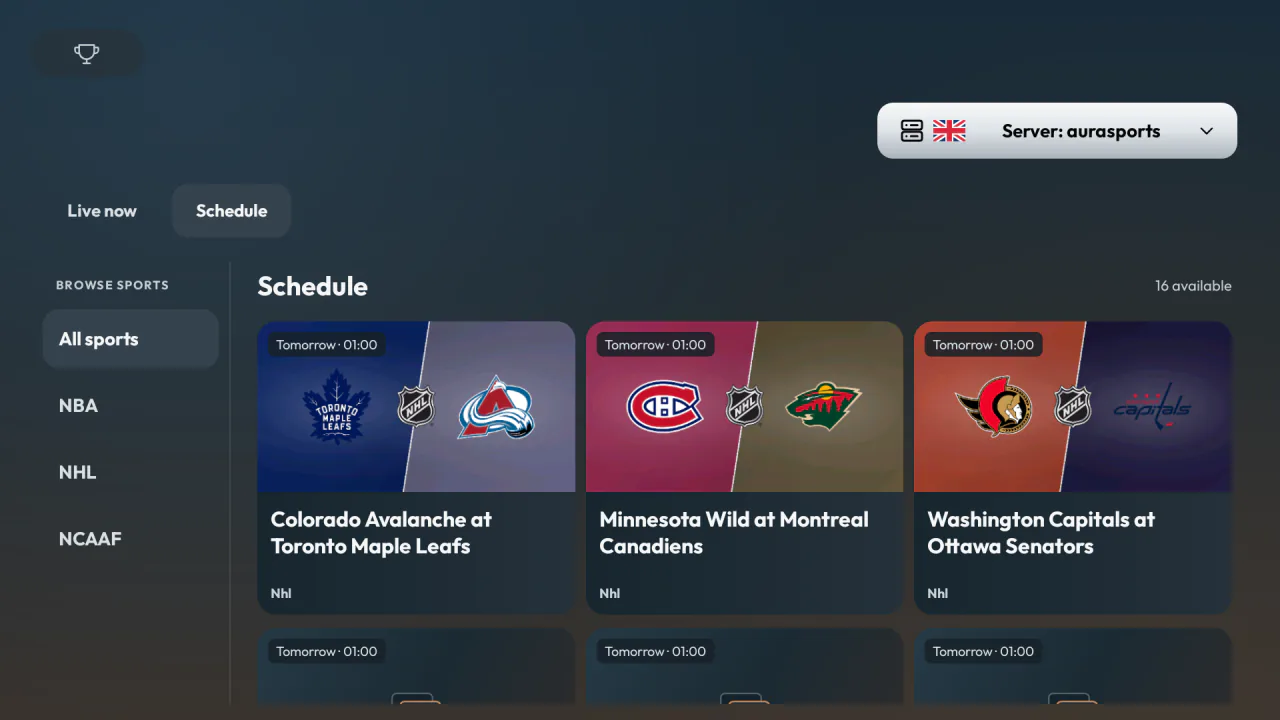
Use Live now at game time
Live now shows the events the selected source currently lists as live. When that view returns no matches, Voltra automatically selects Schedule. You can still check other sports or switch to another enabled server. A source failing to load is a different case: use the retry option shown on the screen or choose another server.
What to try when the match is missing
- Broaden the category. Return to All sports in case the provider grouped the game under a different sport.
- Change the server. Open the server selector, choose another available source, then check Schedule or Live now again. The two sources can publish different games or update their listings at different times.
- Check the listing near kickoff. A schedule entry can appear before its stream is available. Select the event when you’re ready to watch and let Voltra check the available streams.
When to use 24/7 channels
Use 24/7 channels for a continuous sports feed. This tab appears only on sources that support it, and the sport category filter disappears in this view. If you know the station name, you can also search the Channels catalog directly.