
Find the episode before you start
Open the show’s details. On a phone or tablet, tapping Watch now on a series moves the page to its episodes. Choose the season from the dropdown and scroll down the episode list. The same pattern works for an anime series with available episodes. An anime film has a direct playback action.
On TV, use the remote to move from the title’s actions to the season and episode cards. If you have already started the show, the main action can offer the saved episode. Read the season and episode number before opening it, especially when switching between two seasons of the same show.
Jump to another season while watching
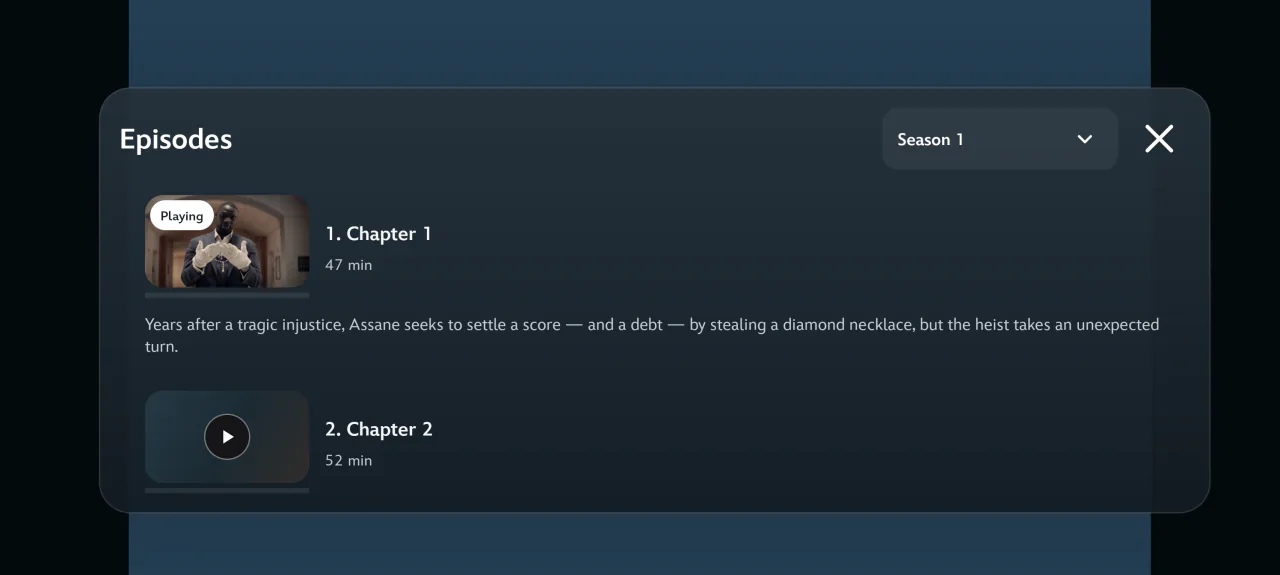
- Show the playback controls, then choose Episodes. On TV, focus starts at the season selector.
- Open the selector to choose a season. When the list loads, use Up or Down on the remote, or scroll on the touchscreen. Look for Playing to identify your current episode.
- Choose the episode itself. If Voltra has a saved position for that episode, select Continue to resume or Start over to play from the beginning.
Move on when the credits roll
Choose Next episode for the next installment in sequence. At the last episode of a season, Voltra checks for the following season and its opening episode. The built-in series player also checks for the next episode when playback finishes. If the next episode has a release date that has not passed, Voltra can show it as unavailable.
If you are returning after a break, the Continue Watching guide explains how to find the last unfinished episode. If the right episode opens but the video fails, try a different playback server for that installment.